5G-Service Based Interface Application
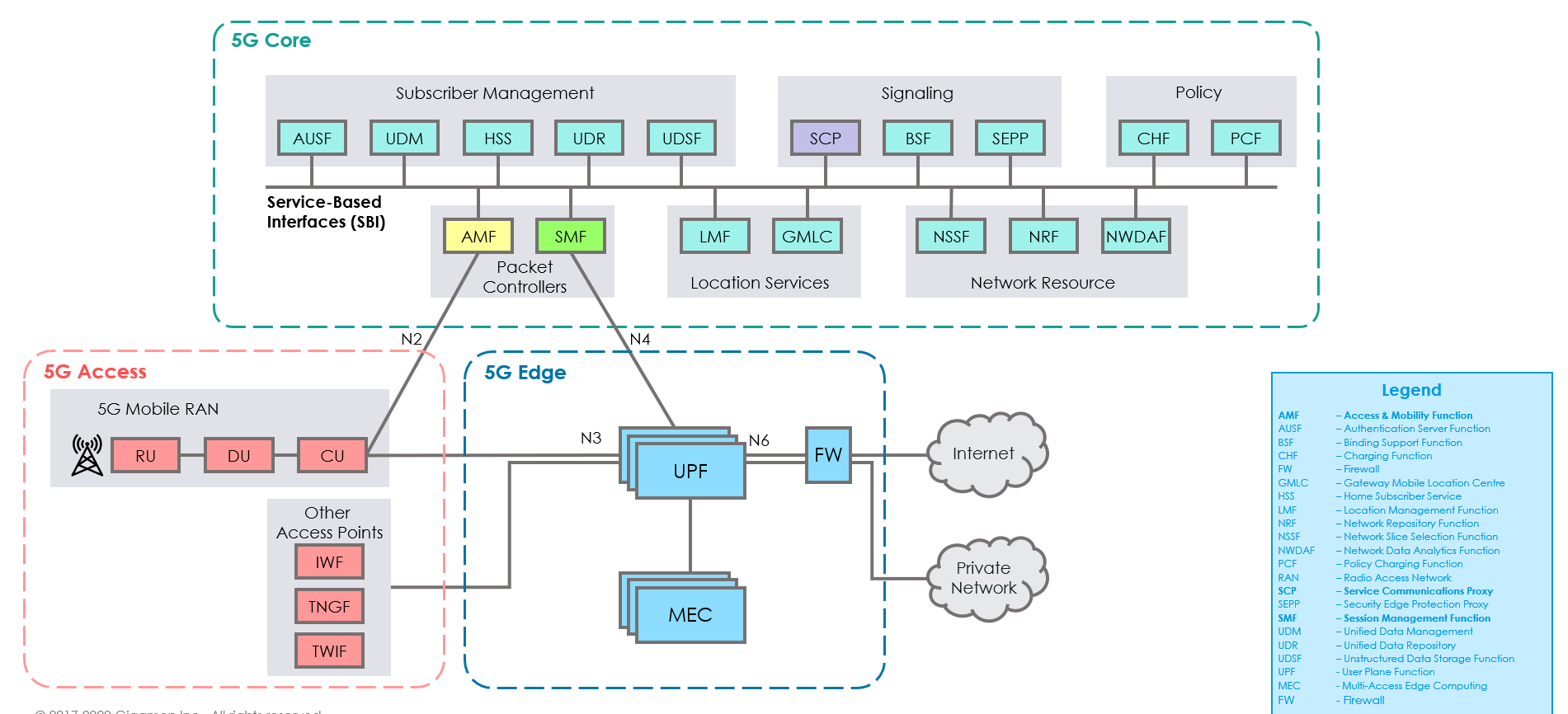
5G-Core is a service-based architecture in which many control plane network functions are available and communication across these network functions happens through the HTTP2 protocol. These HTTP2 transactions are mirrored by specific network functions and are in JSON encoded format.
The 5G-Service Based Interface (SBI) Application synthesizes the HTTP2 transactions with proper L2, L3, and L4 headers from the JSON encoded data that it receives from UDP-GRE. Once the headers are synthesized and a complete HTTP2 transaction is formed, the packets are sent to the egress TEP and then sent to virtual probes.
Ericsson vTAP
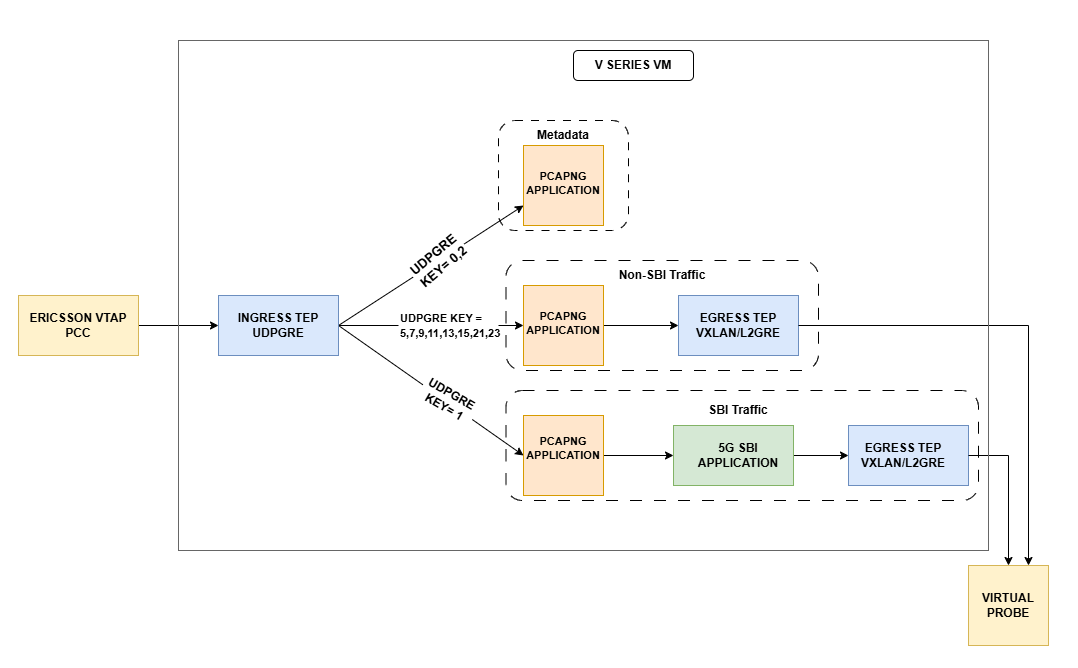
Ericsson 5G Core network functions (PCC (Packet Core Controller), SC (Signaling Controller), CCxx (Cloud Core), etc.) mirror SBI and non-SBI traffic using Ericsson vTAP. The vTAP captures this traffic, encapsulates it using GRE‑in‑UDP with destination UDP port 4754 and GRE Protocol ID 0x8037, and forwards it to Gigamon V Series Nodes.
The Ericsson vTAP payload consists of PCAPng Enhanced Packet Blocks, which the V Series PCAPng and 5G SBI applications process to reconstruct complete HTTP/2 transactions.
These vTAP packets are not raw packets that monitoring tools can understand. Although Ericsson includes rich session information, it is encoded in JSON and cannot be forwarded directly to tools. Therefore, V Series must synthesize tool facing packets by adding the necessary L2/L3/L4 headers and reconstructing valid TCP flows before forwarding it to the external tools over VXLAN or L2GRE egress tunnels.
Ericsson vTAP Domain Tagging
Ericsson vTAP components mirror control plane and selected user plane traffic, for example, from Ericsson PCC nodes, and send it to the GigaVUE V Series using UDP‑GRE with PCAPng/JSON metadata. Previously, the 5G‑SBI application treated all mirrored flows uniformly, requiring monitoring tools to independently infer the Ericsson domain (for example, pc‑mm, pc‑sm, sc‑scp) and the associated 3GPP interface.
With Domain Tagging, the PCAPng application on V Series reads the Ericsson vTAP metadata, identifies the Ericsson domain for each flow, and assigns a VLAN ID based on a configurable domain to VLAN map. When you enable domain classification in the PCAPNG app and VLAN tagging on the VXLAN or L2GRE egress tunnel, V Series tags each packet with the appropriate VLAN so probes can separate domains simply by filtering on VLAN.
You can also reserve VLANs for:
| Traffic mapped to the others domain (for example, unsupported or unexpected Ericsson domains) |
| Traffic mapped to the unclassified domain (for example, traffic for which domain information is not yet available) |
Encoded messages from the Ericsson vTAP contain Kubernetes Pod ephemeral IP addresses for NF instances, which are internal to the Ericsson deployment and not accessible outside the Kubernetes cluster. Because these IPs cannot be used externally, the 5G SBI application always maps the NF identifiers (NF instance ID and FQDN) in the encoded message to the configured ingress IP address using the string‑to‑IP mapping table.
The NF instance ID and FQDN ID must be provided in the form of CSV file. You can upload the CSV file through GigaVUE-FM.
How SBI Application works
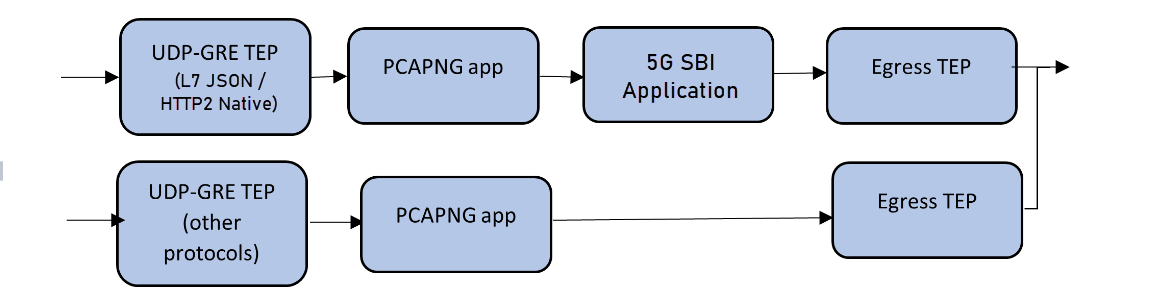
In the GigaVUE V Series Node, the SBI application receives the HTTP2 transaction messages as JSON encoded data from the PCAPng application, which in turn receives the data from the UDP‑GRE TEP.
The SBI application:
| 1. | Parses the JSON data to extract source and destination information, ports, and message type (request/response). |
| 2. | Synthesizes a complete HTTP/2 transaction with L2, L3, and L4 headers, along with the HTTP/2 headers and body from the original transactions. |
| 3. | Sends the synthesized packets to the egress TEP, which forwards them to the appropriate virtual probes. |
The following image shows the block diagram of the data flow in the V Series Node containing the SBI application.
Supported Platforms:
The application is supported on the following platforms:
| VMware ESXi |
| OpenStack |
| Third Party Orchestration |
Rules and Notes
| The maximum number of HTTP2 headers (in the synthesized HTTP2 transactions) that is supported is 64. |
| The PCAPng application that is linked to 5G-SBI application (on the right side) should only be linked to UDP-GRE TEP with key value 1 on the left side. If it is linked to other UDP-GRE TEPs (key values other than 1), then the behavior cannot be defined and leads to unexpected results. |
| The maximum number of NF and FQDN entries supported is 4K. |
| In 5G-SBI application, the V Series node can log the following details to CSV files: |
| Transaction details - Represents the transaction or flow of request and response packets into the application. The details of the flow or transaction are recorded in the CSV file for 5 minutes or 60 minutes based on the configuration. |
| Flow statistics details - Represents the packet and flow statistics in 60 seconds time interval. |
These files help you to understand the records and traffic efficiently. The files are named as per the date and time in which the files were created. When the number and size of files grow, the application automatically detects the old files and deletes them.
| Ericsson vTAP domain tagging can be configured only in primary mode when configuring Pcapng application. Refer to PCAPNG Processing and Flow Tracking. |
End-to End Solution Overview and Configuration:
This section explains how Ericsson vTAP traffic flows through the Gigamon V Series, from ingress UDP‑GRE packets to domain tagged traffic on the egress tunnels. In GigaVUE-FM, you must do the following steps in the Monitoring Session of a Monitoring Domain in the V Series:
| Ingress: Ericsson vTAP UDP‑GRE Feed |
| PCAPNG Processing and Flow Tracking |
| Configure 5G-SBI Application |
| Egress Tunnels and VLAN Tag Insertion |
Ingress: Ericsson vTAP UDP‑GRE Feed
At ingress, Ericsson vTAP mirrors traffic from Ericsson 5G Core network functions and sends it to the Gigamon V Series as UDP‑GRE packets. A specific GRE protocol ID (0x8037) marks the traffic as Ericsson vTAP, and the GRE key indicates what kind of payload is inside (JSON metadata or PCAPNG) and which protocol it carries. Based on this GRE key, the V Series recognizes the packets as Ericsson vTAP traffic and selects the appropriate processing path.
For more details on how to configure UDP-GRE Ingress TEP, refer to the below sections:
| Create Ingress and Egress Tunnel (VMware vCenter) |
| Create Ingress and Egress Tunnels (OpenStack) |
| Create Ingress and Egress Tunnel (Third Party Orchestration) |
PCAPNG Processing and Flow Tracking
In this Ericsson vTAP design, PCAPng classifies flows by Ericsson domain and inserts the corresponding VLAN tag on the egress traffic.
The PCAPNG application on the V Series serves as the configuration point for Ericsson domain classification and VLAN mapping (app mode, domainClassification, flowTimeout, and domainTable). The 5G SBI application performs the actual parsing of Ericsson vTAP metadata, flow and domain determination, and SBI failure detection. The dataplane and egress tunnel configuration apply the VLAN tags and forward the traffic.
To configure a PCAPng application:
| 1. | In the canvas, drag and drop the PCAPng application and select Details. The PCAPng application quick view appears. |
| 2. | On the application quick view, enter or select the required information as described in the following table: |
Field
Description
Application
The name Pcapng appears by default.
Alias
Enter an Alias as required.
App Mode
Set App Mode to Primary to view and configure domain related options.
Notes:
- Primary mode is required to configure domain classification. When you set App Mode to Secondary, Domain Classification, Domain VLAN Mapping, and Flow Timeout fields are not visible.
- Only one Primary PCAPng instance can be configured. If a Primary PCAPng instance already exists, any new PCAPng instance is automatically set to Secondary, and the mode is disabled for editing.
Domain Classification
Enable the Domain Classification option to classify Ericsson vTAP traffic by domain.
Domain VLAN Mapping
From the Domain VLAN Mapping list, select the VLAN mapping profile that maps Ericsson domains to VLAN IDs for per-domain tagging on the egress tunnel.
Click Add New to create a new 5G-Apps configuration. Refer to Adding CSV file for IP Mapping section in 5G-Service Based Interface Application for details. When Domain Classification is enabled, the selected Domain VLAN Mapping is used to tag packets per Ericsson domain with the configured VLAN ID (and, if applicable, a separate VLAN ID for failed SBI transactions) before sending traffic to the probes.
Flow Timeout
Set the Flow Timeout value in seconds to define how long an inactive Ericsson vTAP flow is kept before it is closed and its resources are released.
Valid range: 360-1860
Default value: 660
Note: In the PCAPng configuration, the Domain VLAN Mapping and Flow Timeout fields are displayed only when App Mode is set to Primary and the Domain Classification check box is enabled.
Configure 5G-SBI Application
In V Series, 5G-SBI application receives all the mirrored traffic from 5G-Ericsson.
In GigaVUE-FM, the Vendor Integrations field determines how incoming data is processed. When Ericsson VTap is selected as the vendor integration, the system processes packets accordingly.
You can add a 5G-SBI application to:
| New Monitoring Session - Add the 5G-SBI application after creating a new Monitoring Session and when the GigaVUE-FM canvas appears. Refer to Create a Monitoring Session section in the respective GigaVUE Cloud Suite Deployment Guide. |
| Existing session - Select any existing Monitoring Session and go to TRAFFIC PROCESSING tab. The GigaVUE-FM canvas appears. |
To configure a 5G-SBI application:
| 1. | In the canvas, drag and drop the 5G-SBI application and select Details. The 5G-SBI application quick view appears. |
| 2. | On the application quick view, enter or select the required information as described in the following table: |
Field
Description
Application
The name 5g-sbi appears by default.
Alias
The name sbi5gAppTemplate appears by default.
Vendor Integrations
Select the option ericssonVTap from the drop-down list.
SBI Operational Mode
Select the SBI Monitoring Mode for 5G-SBI Network traffic. L7json is selected by default.
Destination IP
The Destination IP toggle determines how synthesized SCP mediated SBI transactions are tagged. You can choose from the following options:
SCP - Sets the synthesized transaction’s destination IP to the SCP IP address. This option is selected by default.
Destination Network Function - Sets the synthesized transaction’s destination IP to the IP address of the destination network function. Ericsson vTAP Version
Select 1 or 2 from the drop-down list box.
MTU Packet Size
Select how packets should be sent to the tool:
Full Packet - Sends the entire synthesized packet as a single packet without segmentation. The packet is fragmented at the egress TEP.
MTU Size - Segments packets based on the configured tool port MTU value before sending them to the tool. You can specify a value between 1200 and 9200 bytes. Incomplete SBI Transaction Domain Tag
Enable this option to tag unclassified SBI transactions with the dedicated ‘Failed SBI Transaction’ VLAN ID defined in the Domain table. The probe uses this tag to identify and troubleshoot these transactions more effectively.
Note: This option appears only when at least one Primary PCAPng file is configured on a V Series node.
Indexed Headers
Enable the check box to index the HTTP2 headers in the 5G-SBI application.
Compressed Headers
Enable the check box to compress the HTTP2 headers in the 5G-SBI application.
TCP Flows
Specify the maximum number of TCP flows based on the VM form factor:
Small - Supports 128 to 2048 TCP flows
Medium - Supports 128 to 8192 TCP flows
Large - Supports 128 to 16384 TCP flows TCP Flow Timeout
Specify the flow range value (in seconds) that determines how long a TCP flow remains valid in the application.
Minimum value: 0
Maximum Value: 7200
Default value: 1800 Number of Transaction Flows
Specify the maximum number of streams or flows based on the VM form factor:
Small - Supports 1 to 20480 Transaction flows
Medium - Supports 1 to 51200 Transaction flows
Large - Supports 1 to 122880 Transaction flows Request Timeout
Specify the time (in seconds) for which the request packet waits for the response packet in a stream.
Minimum value: 1
Maximum Value: 300
Default value: 10 Response Timeout
Specify the time (in seconds) for which the response packet waits for the request packet in a stream.
Minimum value: 1
Maximum Value: 300
Default value: 2 IP Mapping
Network Function Instance Mapping
Select the required CSV file from the drop-down list with required Network Function Instance ID (NFID) instance mapping.
Select an alias: Choose the alias name associated with the uploaded NFID table (CSV file).
Add a new alias: If no alias exists, click Add New to create one. Refer to Adding CSV file for IP Mapping for details.
FQDN Mapping
Select the required CSV file from the drop-down list with required FQDN mapping.
Select an alias: Choose the alias name associated with the uploaded FQDN table (CSV file).
Add a new alias: If no alias exists, click Add to create one. Refer to Adding CSV file for IP Mapping section for details.
Logging
Transaction Log
Enable or disable 5G-SBI transaction logging. When enabled, transaction logs are written and rotated based on the configured Transaction Log File Interval.
Transaction Log Interval(Minutes)
Set the transaction log file interval in minutes. This defines how often a new Transaction Log CSV file is created.
Valid options: 5 or 60 minutes
Default: 60 This setting is used only when Transaction Log is enabled.
Stats Log
Enable or disable statistics logging for the 5G-SBI application. When enabled, statistics are written to the configured log folder and managed based on the Log Folder Size setting.
Log Folder Size(MB)
Specify the memory size (in MB) allocated to the log folder. This sets the maximum allowable size for the 5G-SBI log folder and applies to both transaction and statistics logs stored in the configured Log Folder Location.
Log Folder Location
Enter the file system path where 5G-SBI log files should be stored. This is the location for both transaction and statistics logs.
Example: /home/user/log
Egress Tunnels and VLAN Tag Insertion
When the V Series classifies Ericsson vTAP traffic by domain in the PCAPNG application, it forwards packets to the probes through egress tunnels (VXLAN or L2GRE).
When creating an Egress tunnel in the Monitoring Session Canvas, enable the Domain Tagging option to tag packets on the egress tunnel with the Ericsson domain-specific VLAN IDs derived from the PCAPng Domain VLAN Mapping.
Note: This setting is available only when Domain Classification is enabled in the associated PCAPng application. Refer to PCAPNG Processing and Flow Tracking for details.
When Domain Classification is enabled in the PCAPNG app and Domain Tagging is enabled on the egress tunnel, the V Series does the following:
| Looks up the Ericsson domain for each packet. |
| Maps it to a VLAN ID from the Domain Table (including any failed SBI or special case VLANs) |
| Inserts that VLAN tag on the egress packet |
This ensures each probe interface only receives the Ericsson domains it is configured to monitor.
For more details on how to configure VXLAN/L2GRE Egress , refer to the below sections:
| Create Ingress and Egress Tunnel (VMware vCenter) |
| Create Ingress and Egress Tunnels (OpenStack) |
| Create Ingress and Egress Tunnel (Third Party Orchestration) |
Deploy the Monitoring Session
After adding all the required elements to the canvas, to deploy the session do the following:
- From the Actions menu, select Deploy.
After successful deployment on all the V Series Nodes, the status appears as Success on the Monitoring Sessions page.
-
View the Deployment Report
-
You can view the Monitoring Session Deployment Report in the SOURCES and V SERIES NODES tab.
-
When you select the Status link, the Deployment Report is displayed.
-
When the deployment is incorrect, the Status column displays one of the following errors:
-
Success: Not deployed on one or more instances due to V Series Node failure.
- Failure: Not deployed on all V Series Nodes or Instances.
-
-
Notes:
- After you deploy a Monitoring Session, you cannot edit its associated 5G SBI or PCAPNG application configurations. To modify them, undeploy the Monitoring Session, update the configuration, and redeploy.
If a PCAPNG application instance is set as the Primary for a Monitoring Session, you cannot delete it while it holds that role. To delete or replace it, undeploy the Monitoring Session or reassign the Primary.
Adding CSV file for IP Mapping
To add the CSV file for IP mapping:
| 1. | Go to Inventory > VIRTUAL > select your cloud platform, and then click Settings > 5G-Apps. The 5G-Apps Configuration page appears. |
| 2. | Click New. Enter the name for the CSV file in the Alias field. |
| 3. | From the Type drop-down list, select one of the following. You can also choose to download the template using the Download Template option and add the required entries. |
| 5G-SBI Network Function Instance - Add the CSV file containing a valid NF instance ID and a valid IPv4/IPv6 address for IP mapping in 5G-Ericsson. |
Header details with an example:
instanceID - e4d909c2-5d2f-4f7f-9bcb-12a3b6c4d789
ipAddress - 1.1.1.1
| 5G-SBI FQDN - Add the CSV file containing a valid FQDN ID and a valid IPv4/IPv6 address for IP mapping. |
Header details with an example:
fqdnID - amf.local
ipAddress - 1.1.1.1
nfType - SCP
| Domain VLAN Mapping - Add the CSV file containing a valid domain and a valid VLAN ID for IP mapping. |
Refer the table below for example header details of the CSV file.
domainName
vlanID
failedSBITransactionVlanID
pc-mm
100
200
pc-sm
300
400
ccsm-5gc
500
ccsm-cnhss
600
ccrc-nrf
700
nrfagent-nrf
800
ccrc-nssf
900
ccpc-pcf
1000
ccpc-provisioning
1100
ccdm-udr-5g
1200
ccdm-provisioning
1300
ccdm-udr-legacy
1400
cces-nef
1500
cces-ees
1600
cces-apigm
1700
sc-bsf
1800
sc-scp
1900
sc-sepp
2000
others
2100
unclassified
2200
| 4. | Click Choose File in File Name field to upload the CSV file into GigaVUE-FM. |
| 5. | Click Validate to validate the CSV file. |
| 6. | Click Save to add the CSV file. |
Notes:
- Failed SBI Transactions are applicable only for pc-mm and pc-sm domains.
- Each domain in the Domain table must use a unique VLAN ID and Failed SBI Transaction ID to allow the probes to distinguish traffic for each Ericsson domain.
Recommended VM Specifications
The configuration of the 5G-SBI application should be performed on large VMs.
| Configuration specifications for large VM: |
| vCPUs: 8 |
| Memory: 16 GB |
| Disk Space: 80 GB |
| Supported Ports: 1 Management interface, 1 ingress, and 1 egress interfaces. |
| It is recommended to use SRIOV enabled drivers for better performance and higher throughput. Refer to Configure GigaVUE Fabric Components using VMware ESXi topic for more details. |
FHA Dashboards for 5G Applications
After configuring the 5G-SBI application, you can monitor the statistics for Ericsson vTAP by the reports displayed in the Dashboard. To access the details, refer to FHA Dashboards for 5G Applications.


